
I have created a page that is using a database connection to an Excel file. In that file are a new employee's first name, last name, their department and new position, as well as the name of a digital photo of them. I originally set it up so it would use "Dynamic Page Creation" to present multiple page, one at a time, if there happened to be multiple employees. Worked just fine but as I was testing, it occurred to me that if I had several new employees that screen would get boring because it would scroll through all of the dynamic pages before going on to the next slide.
Is there a way to just have it pull a random employee each time that page executes? That way we're still introducing new employees but not all 10 in a row.
New Employee Screen - Random
-
Sergey K
Re: New Employee Screen - Random
Hello rdflesher,
Sorry for the delay, we are currently looking for an answer to your question. For this to work we will need to create an advanced select statement to randomly pull an entry from the excel file. It appears that the Rand() function does not work with the excel driver as expected so we are looking for a work around. For reference, here is a post discussing randomizing images in an SQL environment that may help while we look into this further.
http://www.noventri.com/forum/viewtopic.php?f=6&t=77
Sorry for the delay, we are currently looking for an answer to your question. For this to work we will need to create an advanced select statement to randomly pull an entry from the excel file. It appears that the Rand() function does not work with the excel driver as expected so we are looking for a work around. For reference, here is a post discussing randomizing images in an SQL environment that may help while we look into this further.
http://www.noventri.com/forum/viewtopic.php?f=6&t=77
-
Sergey K
Re: New Employee Screen - Random
Hello rdflesher,
After looking over Microsofts limited documentation, we are unaware of any way to achieve this with excel due to the limit's of Microsoft's Excel driver. However, it can be attained using a more robust database such as SQL or MYSQL as refferenced in the previously mentioned post.
Kind Regards,
Sergey
After looking over Microsofts limited documentation, we are unaware of any way to achieve this with excel due to the limit's of Microsoft's Excel driver. However, it can be attained using a more robust database such as SQL or MYSQL as refferenced in the previously mentioned post.
Kind Regards,
Sergey
Re: New Employee Screen - Random
Thank you - Could it be accomplished with Access? Or is the trouble with MS products, in general?

Re: New Employee Screen - Random
Hello rdflesher,
Microsoft Access seems to have the same limitation with the Rand() function. While Microsoft's documentation claims this function is supported, their driver returns, "Undefined Function" when used.
However, you could use the following SELECT statement in either Excel or Access as a workaround:
SELECT * FROM [TableName] ORDER BY Rnd(ColumnName)
This will cause a randomly ordered result set to appear each time the "Update Interval" has been reached. Therefore, you will want to set your project to use the database formatters "[1:Colname]". Then, each time you press the "Refresh Now" button in the Noventri Suite, you will see a random row from the table.
NOTE: You will want to keep the "Update Interval" set to something reasonable so that we don't overload the Server with never-ending updates. Depending on the length of your sequence you may want to aim for a 5 minute update interval.
It is also recommended that you turn off "Secure Sockets Mode" and "Decompress Content" on the SF-100e using this project for faster updates.
Kind Regards,
Microsoft Access seems to have the same limitation with the Rand() function. While Microsoft's documentation claims this function is supported, their driver returns, "Undefined Function" when used.
However, you could use the following SELECT statement in either Excel or Access as a workaround:
SELECT * FROM [TableName] ORDER BY Rnd(ColumnName)
This will cause a randomly ordered result set to appear each time the "Update Interval" has been reached. Therefore, you will want to set your project to use the database formatters "[1:Colname]". Then, each time you press the "Refresh Now" button in the Noventri Suite, you will see a random row from the table.
NOTE: You will want to keep the "Update Interval" set to something reasonable so that we don't overload the Server with never-ending updates. Depending on the length of your sequence you may want to aim for a 5 minute update interval.
It is also recommended that you turn off "Secure Sockets Mode" and "Decompress Content" on the SF-100e using this project for faster updates.
Kind Regards,
Tim Rollins
Executive Director of Technology
Noventri
20940 Twin Springs Dr.
Smithsburg, MD 21783-1510 USA
301-790-0103
Fax: 301-790-0173
http://www.noventri.com
Executive Director of Technology
Noventri
20940 Twin Springs Dr.
Smithsburg, MD 21783-1510 USA
301-790-0103
Fax: 301-790-0173
http://www.noventri.com
Re: New Employee Screen - Random
One thing I left out:
The column used in the Rnd(ColumnName) function will need to be numbered IDs. For example:
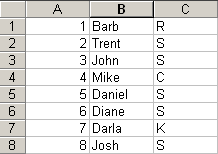
The Rnd() function requires integer values to compare against.
Kind Regards,
The column used in the Rnd(ColumnName) function will need to be numbered IDs. For example:
The Rnd() function requires integer values to compare against.
Kind Regards,
Tim Rollins
Executive Director of Technology
Noventri
20940 Twin Springs Dr.
Smithsburg, MD 21783-1510 USA
301-790-0103
Fax: 301-790-0173
http://www.noventri.com
Executive Director of Technology
Noventri
20940 Twin Springs Dr.
Smithsburg, MD 21783-1510 USA
301-790-0103
Fax: 301-790-0173
http://www.noventri.com
Re: New Employee Screen - Random
Hmmm - when I do the above (I'm using Access), it seems to randomize the order but everytime I hit Refresh, that order is the same. For giggles, I set the refresh to 1 minute and uploaded it to the server. Still the same result - Only one of the four records shows, the same one.
-
Trent S

- Noventri Digital Signage Expert

- Posts: 71
- Joined: Thu Dec 10, 2009 1:51 pm
- Location: Maryland, USA
- Contact:
Re: New Employee Screen - Random
Hello rdflesher,
Would you be able to supply us with a copy of your example database?
You can e-mail it to our support team at support@noventri.com.
Thanks,
-Trent
Would you be able to supply us with a copy of your example database?
You can e-mail it to our support team at support@noventri.com.
Thanks,
-Trent
Trent Semler
Art Director
Specialized Communications Corp. / Noventri
20940 Twin Springs Dr.
Smithsburg, MD 21783-1510 USA
301-790-0103
Digital Information Display
Menu Display
Flight Board
Art Director
Specialized Communications Corp. / Noventri
20940 Twin Springs Dr.
Smithsburg, MD 21783-1510 USA
301-790-0103
Digital Information Display
Menu Display
Flight Board
Re: New Employee Screen - Random
simply using ORDER BY rnd(columnname) doesn't seem to change the sort order on each refresh. However using
SELECT * FROM [Sheet1$] ORDER BY rnd(-(1000*columnname)*time()) does seem to work when using Excel as the data source.
I didn't write the above; I found it here: http://www.ozgrid.com/forum/showthread.php?t=32026
-Greg
SELECT * FROM [Sheet1$] ORDER BY rnd(-(1000*columnname)*time()) does seem to work when using Excel as the data source.
I didn't write the above; I found it here: http://www.ozgrid.com/forum/showthread.php?t=32026
-Greg