It is currently Sat May 18, 2013 7:41 am


 Page 1 of 1 [ 5 posts ] 
Author Message
 Post subject: How to create a graphic element that moves each day?
PostPosted: Thu Feb 16, 2012 4:50 pm 
Valued Contributor
Valued Contributor

Joined: Thu Dec 01, 2011 3:43 pm
Posts: 22
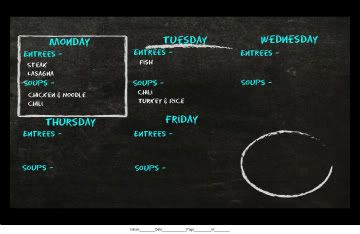
OK - our cafe wants to adverstise their weekly menu on screens around our site. Pulling the information from the spreasheet that populates the actual menu board is pretty straight foward but on this screen, I'd like to go one step further. I would like a box or underline (see picture, Monday & Tuesday for examples) that every day will "move" to the current day. So, Monday the box is around Monday's offering, Tuesday? It uncircles the Tuesday food. Both the line and the box are transparent .png files.

Image

What clever way do you have up your sleeve to accomplish this?


Offline
 Profile  
 
 Post subject: Re: How to create a graphic element that moves each day?
PostPosted: Thu Feb 16, 2012 7:17 pm 
Noventri Digital Signage Expert
User avatar

Joined: Thu Dec 10, 2009 1:50 pm
Posts: 10
Hello rdflesher,

This can be achieved by using a fullscreen image region that uses the ODBC data source to tell us which png to use. Since your menu information is coming from a spreadsheet, I will assume excel, we can use that data source to tell us which day of the week it is. By using an "Advanced" SELECT statement (applying to excel) such as:

SELECT *, WEEKDAY(NOW()) AS Weekday FROM [TableNameHere$]
For other community users who are not familiar with data source connectivity see this post http://www.noventri.com/forum/viewtopic.php?f=6&t=225.

This statement will return all of the columns from your spreadsheet as well as a new column called "Weekday".

The "Weekday" column will be a number representing the day of the week. For example 1 would be Sunday, 2 would be Monday, 3 would be Tuesday, etc.

The way an image region makes use of the ODBC data source is by allowing the returned data to complete a portion of the file path to the image. Therefore, we will want to have a directory of images for each day of the week. For example:

Box1.png
Box2.png
Box3.png
Box4.png
Box5.png
Box6.png
Box7.png

Each image would be a full screen transparent png with the box/line in the appropriate location for the day of week.

Now we are ready to point our project to these images. Back in our image region with the previously mentioned advanced SELECT statement - Enter the image path to your directory of images for each day of the week with the database formatter in place of the number. For example:

C:\Images\Box[1:Weekday].png

Now you can press "Refresh Now" on the "Advanced" tab and you will see the box around the applicable day.

I hope this solves your goal, and please let us know if it does not or if you have any questions.


_________________
Tim Rollins
Executive Director of Operations
Noventri
20940 Twin Springs Dr.
Smithsburg, MD 21783-1510 USA
301-790-0103
Fax: 301-790-0173
http://www.noventri.com
Offline
 Profile  
 
 Post subject: Re: How to create a graphic element that moves each day?
PostPosted: Fri Feb 17, 2012 3:34 pm 
Valued Contributor
Valued Contributor

Joined: Thu Dec 01, 2011 3:43 pm
Posts: 22
So the seven images are full screen with the Box or line moving around on the image to the respective day's information position? Not just the little box or line itself, huh?


Offline
 Profile  
 
 Post subject: Re: How to create a graphic element that moves each day?
PostPosted: Tue Feb 21, 2012 12:57 pm 
Noventri Digital Signage Expert

Joined: Thu Dec 10, 2009 2:02 pm
Posts: 5
rdflesher wrote:
So the seven images are full screen with the Box or line moving around on the image to the respective day's information position? Not just the little box or line itself, huh?


That is correct. The regions themselves will not move. One does not necessarily need to create a full screen image(s)/region(s). Instead one can use smaller images, and create regions directly over the area they want the image to appear. That would mean naming the images a bit differently.

Instead of Box1.png, Box2.png, etc.

One will have a region positioned over each day and images named:

MonBox2.png
TueBox3.png
WedBox4.png
ThuBox5.png
FriBox6.png

Each region formatter will look like this:

MonBox[1:1].png
TueBox[1:1].png
WedBox[1:1].png
ThuBox[1:1].png
FriBox[1:1].png

So the Monday box will only show up on Monday because of the number.

This example requires more regions but uses smaller images. It's the same idea though.

- Mike C


Offline
 Profile  
 
 Post subject: Re: How to create a graphic element that moves each day?
PostPosted: Tue Feb 21, 2012 2:14 pm 
Valued Contributor
Valued Contributor

Joined: Thu Dec 01, 2011 3:43 pm
Posts: 22
I like this solution, too. Especially because it's easier to reposition the smaller images. Thanks a lot.


Offline
 Profile  
 
Display posts from previous:  Sort by  
 Page 1 of 1 [ 5 posts ] 


You cannot post new topics in this forum
You cannot reply to topics in this forum
You cannot edit your posts in this forum
You cannot delete your posts in this forum
You cannot post attachments in this forum

Search for:
Jump to:  

cron